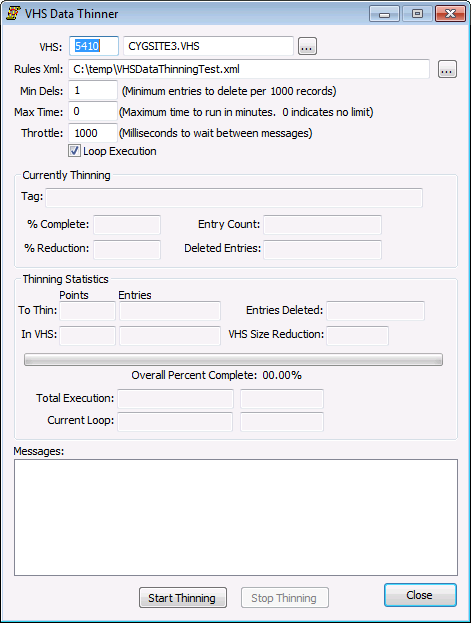
Since thinning models and rules are defined using the VHS Data Analyzer, very few options need to be configured when starting the thinner.
The properties at the top of the VHS Data Thinner dialog box must be configured before the thinner can be started.
| Property | Description |
|---|---|
|
VHS |
This is the domain and Site.Service of the VHS to which the thinning should be applied. The appropriate domain number must be entered manually. It will not update automatically when using the service chooser. |
|
Rules Xml |
This is the path of the XML file containing the thinning rules. This XML file can only be generated by the VHS Data Analyzer. |
|
Min Dels |
Specifies how many entries must need to be deleted per 1000 entries before the thinner will delete the entire block of 1000 entries and re-add the entries that should be saved. Setting the minimum entries to delete to a value higher than 1 will optimize the performance by only performing the delete and re-add process when a significant number of entries need to be deleted per 1000 entry block. |
|
Max Time |
This is the maximum number of minutes that the thinner should run. Since the thinner runs for a long period of time, it may be important to stop it during peak hours of the day. |
|
Throttle |
Number of milliseconds to wait between sending CygNet messages. This will increase the time required to complete data thinning however it can help reduce strain on the system. |
|
Loop Execution |
In a single execution loop, the thinner will run through every point in the VHS and thin them as appropriate. If this option is selected, the thinner will run indefinitely through all the points until the Stop button is pressed. This allows for continuous thinning of the data. If disabled, the thinner will stop after completing a single execution loop. |
To start thinning, click Start Thinning. The thinning may be stopped at any time by clicking Stop Thinning. If the thinning is stopped in the middle of an execution loop, the current state of the thinning cycle will be saved to the XML file. The next time the thinner is run with the same XML file, the user will be prompted to continue where the previous execution was stopped.
If the VHS Data Thinner dialog box is closed the thinning will be stopped, if the dialog box is kept open but is minimized, the data will continue to be thinned.

|
|
|

